 OpenShelf
Free, open-source Tangerine alternative for Mac
OpenShelf is a free, MIT-licensed Mac app: drag a file, tap a key, and drop it on a wheel to convert it, edit it, or put it on a shelf. Tangerine, from Leap Studio, is a drag-and-drop converter that also runs on your Mac. Its press kit lists a one-time price of $29.99 USD for Apple silicon Macs on macOS 13 or later, checked 1 November 2026.
What each one publishes
OpenShelf details are from its README. Tangerine details are from tangerineformac.com and its press kit. Anything those pages don't say is marked not listed. The home page tours the wheels, and the Dropover and Yoink page covers shelves.
| Topic | OpenShelf | Tangerine |
|---|---|---|
| Price | Free. MIT license. No account and no subscription. | $29.99 USD, one-time purchase. Press kit, checked 1 November 2026. |
| Where to get it | Download the DMG or pick a release on GitHub. First launchmacOS asks once on first launch because the app is not notarized by Apple yet. |
The homepage says to download it from the Mac App Store. |
| Macs | macOS 14 Sonoma or later. Apple silicon, and Intel Macs up to macOS 26. macOS 27macOS 27 is Apple silicon only. |
Press kit: Apple silicon Mac, macOS 13 or later. |
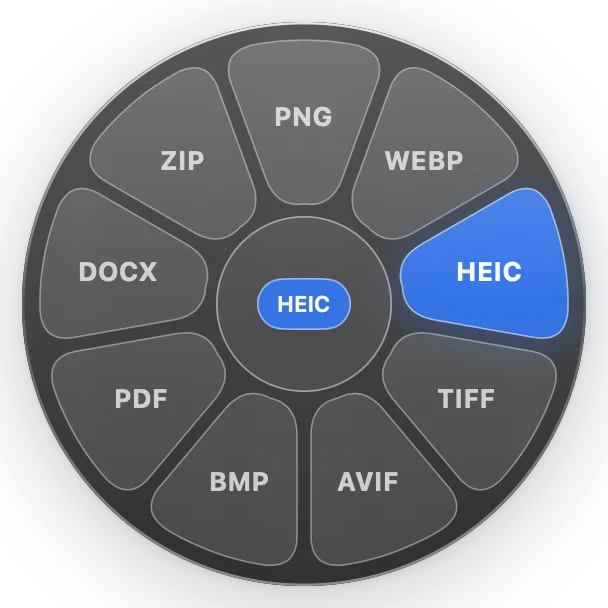
| How it starts | Drag a file, then tap a key. Shift opens Convert, Shift-Option Tools, Control Actions. The wheel appears under the pointer. |
Homepage: drag, tap Shift, and drop. Press kit adds Command for editing tools and Control for actions. Press kit detailShift chooses a format, Command opens editing tools, Control opens actions. The wheel stays open until you drop. |
| Where files are processed | On your Mac. No telemetry. Network use is optional update checks and installing ffmpeg, LibreOffice, or Pandoc if you click Install. | Homepage: conversions and file tools run on your Mac, and files are never uploaded to Tangerine. |
| Conversions | Images, PDFs, documents, spreadsheets, slides, audio, video, subtitles, and archives. Tools and formatsSome formats need the optional ffmpeg, LibreOffice, or Pandoc tools. |
Homepage: images, video, audio, documents, spreadsheets, and archives; 275 conversion options. Press kit listsPress kit adds presentations and subtitles, and says 275 conversion paths. It lists JPG, PNG, WebP, HEIC, TIFF, AVIF, BMP, PDF, MP3, M4A, MP4, MOV, documents, slides, spreadsheets, SRT, VTT, ZIP, TAR, and GZIP. |
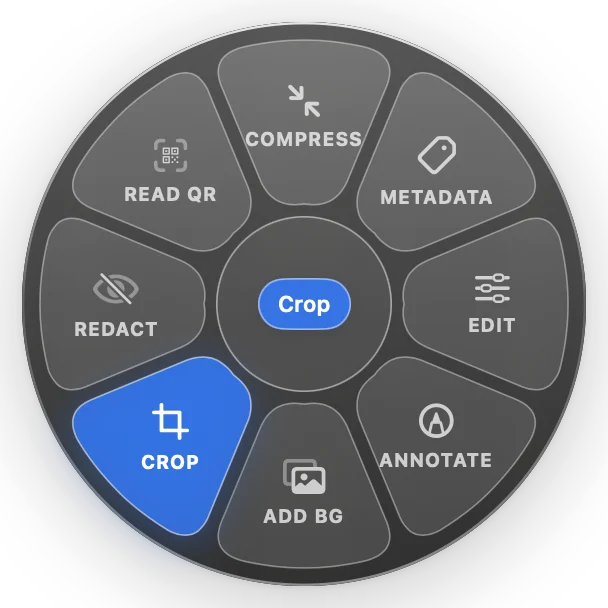
| Editing tools | Images: crop, resize, background, annotate, redact, compress, metadata, QR, OCR. PDFs: combine, split, compress, OCR. Video and audio: trim, speed, crop, rotate, split, merge, compress, mute. Full listImages: Crop, Resize, Remove Background, Add Background, Annotate, Redact, Edit, Compress, Metadata, Read QR, OCR. PDFs: Combine, Pages, Split, Compress, Metadata, OCR. Video and audio: Trim, Speed, Crop, Rotate, Split, Merge, Compress, Mute. |
Homepage: compress, crop, trim, split, merge, and more; 26 advanced file tools. Press kitPress kit: compression, metadata, cropping, trimming, splitting, merging, and more. |
| File actions | Shelf, Add to Shelf, AirDrop, Copy, Move, Copy Path, Terminal. | AirDrop, Float, Copy, Move, Copy Path, and Terminal. What Float does beyond the name is not listed. |
| Where the result goes | Next to the original, under a new name. A file converted from a shelf is also added back to that shelf. | Press kit: converted or edited copies are saved beside the original. |
| Source code | Open source, MIT. GitHub. | Not listed. |
Checked 1 November 2026: tangerineformac.com and the press kit. OpenShelf from the README.
Tangerine and OpenShelf
The short version of the table. Dropover and Yoink are on their own page.
Is OpenShelf free?
Yes. OpenShelf is free and open source under the MIT license. No account and no subscription. Tangerine's press kit lists a one-time price of $29.99 USD, checked 1 November 2026.
Does either app upload files to convert them?
OpenShelf runs every conversion on your Mac. The only network access is checking GitHub for updates, which you can turn off, and downloading ffmpeg, LibreOffice, or Pandoc if you click Install. Tangerine's homepage says conversions and file tools run on your Mac and that your files are never uploaded to them.
Which Macs does each one support?
OpenShelf needs macOS 14 Sonoma or later. It runs on Apple silicon, and on Intel Macs up to macOS 26, because macOS 27 is Apple silicon only. Tangerine's press kit says an Apple silicon Mac and macOS 13 or later.
Can I shelve files, or only convert them?
OpenShelf can put files on a floating shelf without moving them, dock that shelf to the left or right edge of the screen, and watch a folder such as Downloads or your screenshots folder. Tangerine lists Float among AirDrop, Copy, Move, Copy Path, and Terminal. The pages checked do not say what Float does beyond that name.
Where do I download OpenShelf?
Download the latest DMG, or browse releases on GitHub. The home page walks through the wheels, and the Dropover and Yoink page compares the shelf.